
Flex Rating Component
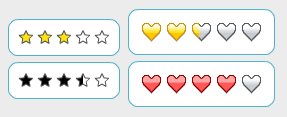 For our new Fill Colors site, Nahuel developed a rating component to allow people to rate the Flex skins in the gallery. In this blog, we'd like to share this straightforward and easy-to-use component.
To use the rating component, you simply use a single tag <controls:Rating/> and you can specify optional attributes. We have examples of different attributes being used along with the source.
In one of the more interesting examples, Example 5, we want the rating the user selects to be displayed both in the rating component and as a number. So we add the following attributes and text that will display the selected value:
<controls:Rating id="ratingExample5" showSelectedValue="true" />
<mx:Text text="Currently selected value: {ratingExample5.selectedValue}" />
For more information, we also have the API documentation.
View example (View source enabled on Right Click)
Download the source
View API documentation

Martin Cooper
Josh Tynjala
Laura
We probably should make an example of that or modify the Rating class so that implements the item renderer interfaces, but this is a simple way:
1. Create a simple mxml class, say that extends Canvas. You could implement mx.core.IDataRenderer or simply have a data variable.
2. Place the <Rating> tag inside and bind to the data.yourRatingValue property (the name of your property depends on what you are using as the dataprovider for your grid).
Juan
http://flexibleexperiments.wordpress.com/2007/04/28/flex-201-rating-component/
Albert Pack
Cesare
Have you plans for a new renderer?
Laura
We do plan to implement the IDataRenderer so that it can be placed inside a datagrid or list.
insurancerelease.com
shawn gibson
HepYek
Fernando
limitedwave
Laura
When the rating is clicked and changes its value, you get a selectionChange event, so that you could do:
<controls:Rating selectionChange="trace('user has changed the selection!')" />
Nathan D
Laura
We'll check that out and try to fix the bug.
Glenn
The bug occurs when horizontalGap is set to 0. If you change it to 5 for example, there's a bigger gap between the individual images. If the mouse is moved from one custom image to another one, the mouse is moved over the gap which causes a 'mouseOut Event'. The previous selected image will be set 'unselected'
Tom
<controls:Rating x="5" y="70" horizontalGap="1" />
But I got an error when I run it, I dont know why, your style declaration seems good, but Flex searchs the horizontalGap property in Rating object rather than style.
Any idea?
Anusheel Verma
Greate component, I am using it in my application, can we extend this component to accept picking half stars (Ex : I need to select 3.5 Star).
Laura
It might be a bug. We'll see if we can fix it.
Anusheel,
You can make modifications, you just need to comply with the license: ttp://www.apache.org/licenses/LICENSE-2.0
Tahir
a little thing can impresss me very much.
Tahir Alvi
Shabith Ishan
Colin Hansford
If there is not a version for item renderer / dataGrid, would you be able to post details of the simple workaround you briefly outlined in post #3 to Martin above?
Colin
ip
I tried to align the stars verticaly by changeing xPos to yPos under "layoutItems" but then I can only select one value.
What do I have to change?
Thanks
Antoine
Lee Probert
Lee Probert
Also, I managed to get this component working in the Flex 4 SDK only if you set the Stars skins with a Stylesheet. It doesn't want to compile with the default skins.
I noticed that if the horizontal gap is zero then the component doesn't trigger a new MouseOver event when you roll over a new star. This is because the event is triggered by rolling over the entire component and not the individual stars. To fix this change the listener from MouseOver to MouseMove.
gabriel
But I would like to disable the capability of voting once I have vote, has the component any method to do that?
Thanks
Rodrigo Montemayor
Alessio
mpre
MPRE
Joy
This is a great component. Hope it will be updated with flex 4, too!
abhishek
flex 4?
:)
anonymous
Rating.as 675: selectedValue = (selectedValue==1 && rollOverValue==1) ? 0 : rollOverValue;Laura
Do you want to remove the rating when they click on the same star again or how?
Ramu
I've the requirement like i want to show the star rating number on top of the star image.. and i dont want to show all the star images. i've only one image on top of it it will show the star rating in numaric number..
please help in.. in this...
thanks in advance..
Regards
Ramu
addi
public static function initDefaultStyles(className:String):void
{
var style:CSSStyleDeclaration = new CSSStyleDeclaration();
style.defaultFactory = function():void
{
this.disabledSkin = Star;
this.overSkin = OverStar;
this.unselectedSkin = Star;
this.upSkin = SelectedStar;
this.selectedSkin = SelectedStar;
this.horizontalGap = 5;
this.paddingBottom = 0;
this.paddingTop = 0;
this.paddingLeft = 0;
this.paddingRight = 0;
}
var myStyleManager:IStyleManager2;
myStyleManager=mx.styles.StyleManager.getStyleManager(SystemManagerGlobals.topLevelSystemManagers[0]);
myStyleManager.setStyleDeclaration(className, style, true);
}
can you reply me?
steve
pleaaase update :)
alpar